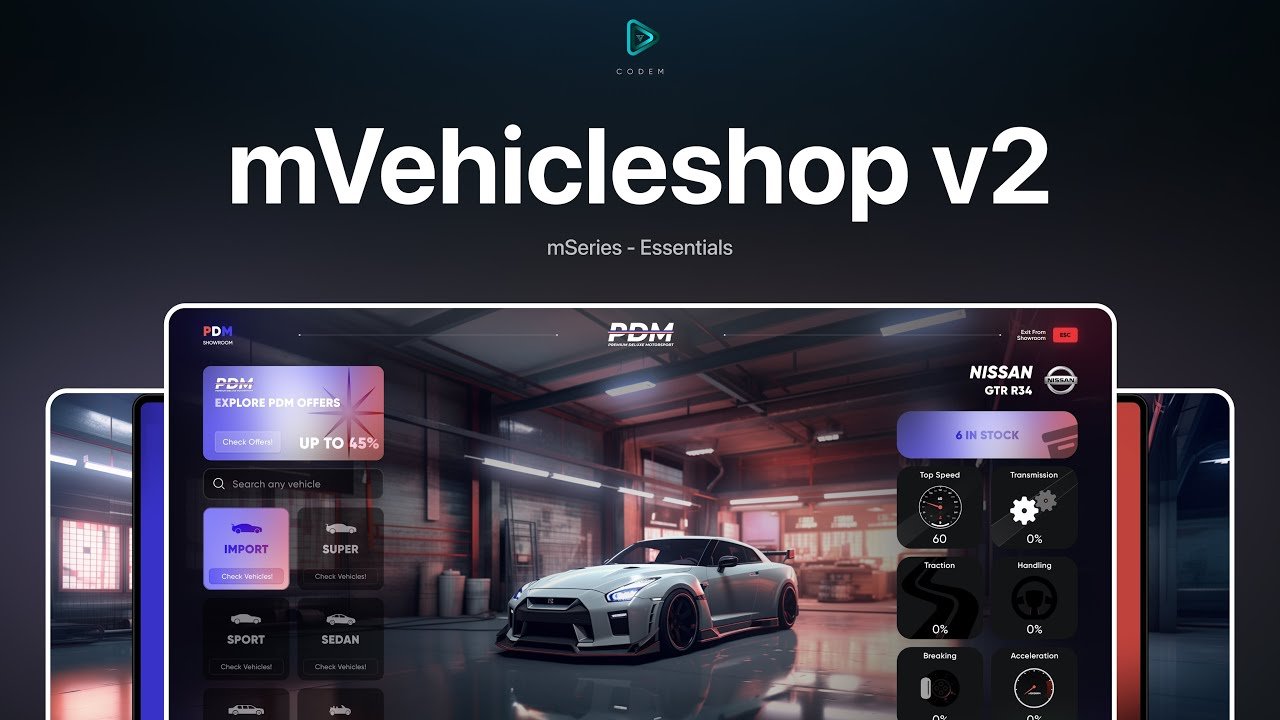
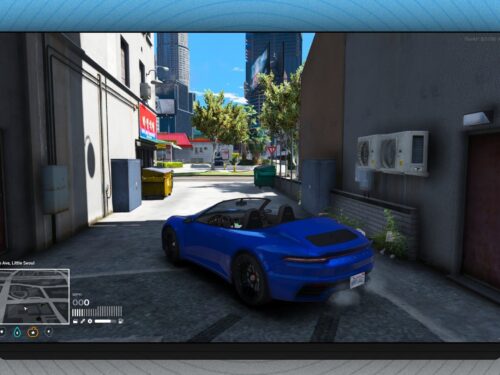
CodeM mVehicleshop v2 est un script de concessionnaire automobile FiveM configurable pour ESX ou QBCore avec des options de clé de véhicule, de verrouillage de voiture et de système de carburant.
Config = {
Framework = "qbcore", -- esx or qbcore Change SQLVehiclesTable in config_server.lua
FrameworkCustomName = false, -- if you have custom framework name, set this to your framework name or leave it false
saveMods = false, -- true if you want everything to be saved in the mods or vehicle table
NewESX = true,
Vehiclekey = true,
VehicleSystem = "qb-vehiclekeys", -- cd_garage / qs-vehiclekeys / wasabi-carlock / qb-vehiclekeys
VehicleRemovekey = false, -- Do NOT Touch if you have any car lock system
VehicleRemoveKeySystem = "qs-vehiclekeys", -- cd_garage / qs-vehiclekeys / qb-vehiclekeys
EnableFuel = true,
FuelSystem = 'LegacyFuel', -- LegacyFuel / ox-fuel / x-fuel / frfuel / cdn-fuel / hyon_gas_station / nd-fuel
InteractionHandler = 'drawtext', -- 'drawtext (included drawmarker)' , 'qb-target' , 'ox_target' (u can add your own handler in client/cl_interactions.lua)
CleanSQLLogs = false, -- if you want to clear the logs in the database, set this to true and they will be cleared on every restart
Locations = {
["pdm_main_1"] = {
coords = vector3(-33.32, -1104.18, 25.45), -- marker and blip coords
type = "car", -- car or boat or plane or heli or custom (for database type column)
-- accessJob = "cardealer", -- if you want to restrict access to a job, set this to job name
-- managementJob = "police",
preview = { -- vehicle preview
campos = vector3(-45.76, -1100.8, 26.42),
camrot = vector3(0.0, 0.0, -16.0),
vehpos = vector4(-44.51, -1096.19, 25.82, 120.0),
},
name = "PDM Main",
blip = {
show = true, -- if you want to disable the blip, set this to false
sprite = 326,
color = 2,
scale = 0.8,
},
marker = {
type = 23, -- if you want to disable the marker, set this to false
scale = vector3(1, 1, 1),
color = vector3(0, 255, 255),
label = "Press ~g~[E]~s~ to open the vehicle shop",
labelOffset = vector3(0, 0, 1.0)
},
bossmarker = {
coords = vector3(-30.37, -1105.92, 26.5),
type = 21, -- if you want to disable the marker, set this to false
scale = vector3(0.5, 0.5, 0.2),
color = vector3(0, 255, 255),
label = "Press ~g~[E]~s~ to open the boss menu",
labelOffset = vector3(0, 0, -0.7)
},
testdrive = {
spawn = vector4(-9.87, -1096.9, 25.84, 98.82),
time = 60, -- in seconds
},
vehiclespawn = vector4(-16.56, -1081.61, 26.07, 127.53),
defaultPreset = "pdm"
},
["boat_shop_1"] = {
coords = vector3(-719.34, -1326.17, 0.65),
type = "boat", -- car or boat or plane or heli or custom (for database type column)
-- accessJob = "cardealer",
-- managementJob = "police",
preview = {
campos = vector3(-718.3, -1335.79, 0.45),
camrot = vector3(0.0, 0.0, 279.19),
vehpos = vector4(-712.34, -1339.32, 0.14, 140.66),
maxFov = 90.0,
},
name = "Boat Shop",
blip = {
show = true, -- if you want to disable the blip, set this to false
sprite = 410,
color = 2,
scale = 0.8,
},
marker = {
type = 23, -- if you want to disable the marker, set this to false
scale = vector3(1, 1, 1),
color = vector3(0, 255, 255),
label = "Press ~g~[E]~s~ to open the boat shop",
labelOffset = vector3(0, 0, 1.0)
},
bossmarker = {
coords = vector3(-730.48, -1318.62, 1.6),
type = 21, -- if you want to disable the marker, set this to false
scale = vector3(0.5, 0.5, 0.2),
color = vector3(0, 255, 255),
label = "Press ~g~[E]~s~ to open the boss menu",
labelOffset = vector3(0, 0, -0.7)
},
testdrive = {
spawn = vector4(-727.55, -1367.86, 0.52, 136.62),
time = 60, -- in seconds
},
vehiclespawn = vector4(-727.55, -1367.86, 0.52, 136.62),
defaultPreset = "boat_shop"
},
["plane_shop_1"] = {
coords = vector3(-994.55, -2948.14, 12.96),
type = "airplane", -- car or boat or plane or heli or custom (for database type column)
-- accessJob = "cardealer",
-- managementJob = "police",
preview = {
campos = vector3(-980.86, -2980.79, 16.07),
camrot = vector3(0.0, 0.0, 185.54),
vehpos = vector4(-978.98, -2993.67, 13.95, 63.26),
maxFov = 90.0,
},
name = "Plane Shop",
blip = {
show = true, -- if you want to disable the blip, set this to false
sprite = 16,
color = 2,
scale = 0.8,
},
marker = {
type = 23, -- if you want to disable the marker, set this to false
scale = vector3(1, 1, 1),
color = vector3(0, 255, 255),
label = "Press ~g~[E]~s~ to open the plane shop",
labelOffset = vector3(0, 0, 1.0)
},
bossmarker = {
coords = vector3(-730.48, -1318.62, 1.6),
type = 21, -- if you want to disable the marker, set this to false
scale = vector3(0.5, 0.5, 0.2),
color = vector3(0, 255, 255),
label = "Press ~g~[E]~s~ to open the boss menu",
labelOffset = vector3(0, 0, -0.7)
},
testdrive = {
spawn = vector4(-978.98, -2993.67, 13.95, 63.26),
time = 60, -- in seconds
},
vehiclespawn = vector4(-978.98, -2993.67, 13.95, 63.26),
defaultPreset = "plane_shop"
},
["heli_shop_1"] = {
coords = vector3(-697.55, -1423.4, 4.0),
type = "airplane", -- car or boat or plane or heli or custom (for database type column)
-- accessJob = "cardealer",
-- managementJob = "police",
preview = {
campos = vector3(-726.76, -1455.1, 5.51),
camrot = vector3(0.0, 0.0, 358.97),
vehpos = vector4(-723.78, -1443.38, 5.66, 136.1),
maxFov = 90.0,
},
name = "Helicopter Shop",
blip = {
show = true, -- if you want to disable the blip, set this to false
sprite = 16,
color = 2,
scale = 0.8,
},
marker = {
type = 23, -- if you want to disable the marker, set this to false
scale = vector3(1, 1, 1),
color = vector3(0, 255, 255),
label = "Press ~g~[E]~s~ to open the heli shop",
labelOffset = vector3(0, 0, 1.0)
},
bossmarker = {
coords = vector3(-730.48, -1318.62, 1.6),
type = 21, -- if you want to disable the marker, set this to false
scale = vector3(0.5, 0.5, 0.2),
color = vector3(0, 255, 255),
label = "Press ~g~[E]~s~ to open the boss menu",
labelOffset = vector3(0, 0, -0.7)
},
testdrive = {
spawn = vector4(-723.78, -1443.38, 5.66, 136.1),
time = 60, -- in seconds
},
vehiclespawn = vector4(-723.78, -1443.38, 5.66, 136.1),
defaultPreset = "heli_shop"
},
},
UI = {
ppType = "discord", -- steam or discord
customPlatePrice = 15000,
previewColors = { -- https://wiki.rage.mp/index.php?title=Vehicle_Colors | Index for game vehicle, value is for UI (they must be the same)
["0"] = { 13, 17, 22 },
["21"] = { 30, 35, 47 },
["28"] = { 218, 25, 24 },
["80"] = { 66, 113, 225 },
["112"] = { 237, 237, 237 },
["137"] = { 223, 88, 145 },
},
EnableCustomPlate = true,
classDescriptions = {
[0] =
'Compacts in Grand Theft Auto V and Grand Theft Auto Online. These are defined by the Vehicle Class System introduced in GTA V. Those cars are such as Brioso 300 Widebody, Club, Blista Kanjo, Brioso 300, Blista, Brioso R/A, Dilettante, Asbo etc.', -- Compacts
[1] =
'Sedans in Grand Theft Auto V and Grand Theft Auto Online. These are defined by the Vehicle Class System introduced in GTA V. For Sedans in the Grand Theft Auto series, see Sedans. Those cars are such as Emperor, Rhinehart, Tailgater S, Cinquemila, Asea, Super Diamond etc. ', -- Sedans
[2] =
'SUVs in Grand Theft Auto V and Grand Theft Auto Online. These are defined by the Vehicle Class System introduced in GTA V. For a list of all SUVs and SUTs in the Grand Theft Auto series, see SUVs. Those cars are such as XLS, Granger 3600LX, Astron, Patriot, I-Wagen, Rebla GTS, Cavalcade, Dubsta etc. ', -- SUVs
[3] =
'Coupes in Grand Theft Auto V and Grand Theft Auto Online. These are defined by the Vehicle Class System introduced in GTA V. For other Coupes in the Grand Theft Auto series, see Coupes. Those cars are such as Kanjo SJ, Sentinel, Previon, Postlude, Sentinel XS, F620, Oracle, Felon GT etc. ', -- Coupes
[4] =
'Muscle Cars in Grand Theft Auto V and Grand Theft Auto Online. These are defined by the Vehicle Class System introduced in GTA V. For other muscle cars in the Grand Theft Auto series, see Muscle Cars. Those cars are such as Vigero ZX, Ruiner ZZ-8, Greenwood, Phoenix, Dominator GTT, Duke O Death, Chino, Hustler etc. ', -- Muscle
[5] =
'Sports Classics Vehicles in Grand Theft Auto V and Grand Theft Auto Online. These are defined by the Vehicle Class System introduced in GTA V. For other classic cars in the Grand Theft Auto series, see Classic Cars. Those cars are such as Mamba, Toreador, Stirling GT, Turismo Classic, Ardent, Zion Classic, 190z, JB 700 etc.', -- Sports Classics
[6] =
'Sports Cars in Grand Theft Auto V and Grand Theft Auto Online. These are defined by the Vehicle Class System introduced in GTA V. For other sports cars in the Grand Theft Auto series, see Sports Cars. Those cars are such as Hotring Sabre, Locust, 10F Widebody, Paragon R, Corsita, ZR-350, Imorgon, Elegy Retro Custom etc.', -- Sports
[7] =
'Supercars and hypercars in Grand Theft Auto V and Grand Theft Auto Online. These are defined by the Vehicle Class System introduced in GTA V. For other supercars in the Grand Theft Auto series, see Super Cars. Those cars are such as LM87, Torero XO, Cyclone II, Sultan RS, Champion, Vacca, Turismo R, Vigilante etc.', -- Super
[8] =
'Motorcycles in Grand Theft Auto V and Grand Theft Auto Online. These are defined by the Vehicle Class System introduced in GTA V. For other motorcycles in the Grand Theft Auto series, see Motorcycles. Those vehicles are such as Oppressor Mk II, Hakuchou Custom, Oppressor, Bati 800, PCJ 600, Faggio etc.', -- Motorcycles
[9] =
'Off-Road Vehicles in Grand Theft Auto V and Grand Theft Auto Online. These are defined by the Vehicle Class System introduced in GTA V. For Off-Road vehicles in the Grand Theft Auto series, see Off-Road Vehicles. Those cars are such as Dune FAV, Nightshark, Mesa Grande, Draugur, Patriot Mil-Spec, Everon etc.', -- Off-road
[10] =
'Industrial Vehicles in Grand Theft Auto V and Grand Theft Auto Online. These are defined by the Vehicle Class System introduced in GTA V. For other Industrial Vehicles, see Industrial Vehicles. Those cars are such as Guardian, Dozer, Flatbed, Dump, Dock Handler, Mixer etc.', -- Industrial
[11] =
'Utility Vehicles in Grand Theft Auto V and Grand Theft Auto Online. These are defined by the Vehicle Class System introduced in GTA V. For utility vehicles in the entire Grand Theft Auto series, see Utility Vehicles. Those vehicles are such as Mobile Operations Center, Sadler, Towtruck, Caddy, Slamtruck, Trailer, Tractor etc.', -- Utility
[12] =
'Vans in Grand Theft Auto V and Grand Theft Auto Online. These are defined by the Vehicle Class System introduced in GTA V. For all vans in the Grand Theft Auto series, see Vans. Those cars are such as Bison, Speedo Custom, Rumpo Custom, Journey, Surfer, Burrito, Youga Custom etc.', -- Vans
[13] =
'Cycles (bicycles) in Grand Theft Auto V and Grand Theft Auto Online. These are defined by the Vehicle Class System introduced in GTA V. For other bicycles in the Grand Theft Auto series, see Bicycles. Those bicycles are such as BMX, Fixter, Scorcher, Tri-Cycles Race Bike etc.', -- Cycles
[14] =
'Boats in Grand Theft Auto V and Grand Theft Auto Online. These are defined by the Vehicle Class System introduced in GTA V. Those boats are such as Kosatka, Submersible, Kraken, Avisa, Marquis, Dinghy, Predator etc.', -- Boats
[15] =
'Helicopters in Grand Theft Auto V and Grand Theft Auto Online. These are defined by the Vehicle Class System introduced in GTA V. For helicopters in the Grand Theft Auto series, see Helicopters. Those helicopters are such as Sparrow, Akula, Cargobob, Hunter, Police Maverick etc. ', -- Helicopters
[16] =
'Planes in Grand Theft Auto V and Grand Theft Auto Online. These are defined by the Vehicle Class System introduced in GTA V. For other planes/aircraft in the series, see Fixed-Wing Aircraft. Those aircrafts are such as P-996 LAZER, RO-86 Alkonost, Hydra, Volatol etc.', -- Planes
[17] =
'Public Service Vehicles in Grand Theft Auto V and Grand Theft Auto Online. These are defined by the Vehicle Class System introduced in GTA V. Those vehicles are such as Bus, Festival Bus, Taxi, Dune, Dashound, Trashmaster etc.', -- Service
[18] =
'Emergency Vehicles in Grand Theft Auto V and Grand Theft Auto Online. These are defined by the Vehicle Class System introduced in GTA V. For other emergency vehicles in the Grand Theft Auto series, see Emergency Vehicles. Those vehicles are such as FIB Buffalo, Police Buffalo, Police Cruiser, Fire Truck, Ambulance, Police Roadcruiser, Police Riot etc. ', -- Emergency
[19] =
'Military Vehicles in Grand Theft Auto V and Grand Theft Auto Online. These are defined by the Vehicle Class System introduced in GTA V. For other military vehicles, see Military Vehicles. Those vehicles are such as TM-02 Khanjali, APC, Anti-Aircraft Trailer, Rhino etc. ', -- Military
[20] =
'Commercial Vehicles in Grand Theft Auto V and Grand Theft Auto Online. These are defined by the Vehicle Class System introduced in GTA V. Those vehicles are such as Terrorbyte, Securicar, Mule, Pounder Custom, Phantom Wedge, Hauler Custom, Phantom, Mule Custom etc.' -- Commercial
}
},
-- functions
OnVehicleBought = function(shopId, vehicle, plate)
if plate == nil then
plate = GetVehicleNumberPlateText(vehicle)
else
plate = plate
end
--example events for qbcore
TaskWarpPedIntoVehicle(PlayerPedId(), vehicle, -1)
if Config.Vehiclekey then
TriggerEvent("vehiclekeys:client:SetOwner", plate)
if Config.VehicleSystem == 'cd_garage' then
TriggerEvent('cd_garage:AddKeys', exports['cd_garage']:GetPlate(vehicle))
elseif Config.VehicleSystem == 'qs-vehiclekeys' then
exports['qs-vehiclekeys']:GiveKeys(plate)
elseif Config.VehicleSystem == 'wasabi-carlock' then
exports.wasabi_carlock:GiveKey(plate)
elseif Config.VehicleSystem == 'qb-vehiclekeys' then
TriggerServerEvent('qb-vehiclekeys:server:AcquireVehicleKeys', plate)
end
end
if Config.EnableFuel then
if Config.FuelSystem == 'LegacyFuel' then
return exports["LegacyFuel"]:SetFuel(vehicle, 100)
elseif Config.FuelSystem == 'x-fuel' then
return exports["x-fuel"]:SetFuel(vehicle, 100)
elseif Config.FuelSystem == 'ox-fuel' then
return SetVehicleFuelLevel(vehicle, 100)
elseif Config.FuelSystem == 'nd-fuel' then
return exports["nd-fuel"]:SetFuel(vehicle, 100)
elseif Config.FuelSystem == 'frfuel' then
return exports.frfuel:setFuel(vehicle, 100)
elseif Config.FuelSystem == 'cdn-fuel' then
return exports['cdn-fuel']:SetFuel(vehicle, 100)
elseif Config.FuelSystem == 'hyon_gas_station' then
return exports["hyon_gas_station"]:SetFuel(vehicle, 100)
end
end
end,
RemoveVehicleKeys = function(vehicle)
if Config.VehicleRemovekey then
local plate = GetVehicleNumberPlateText(vehicle)
TaskWarpPedIntoVehicle(PlayerPedId(), vehicle, -1)
if Config.VehicleRemoveKeySystem == 'cd_garage' then
TriggerServerEvent('cd_garage:RemovePersistentVehicles', exports['cd_garage']:GetPlate(vehicle))
elseif Config.VehicleRemoveKeySystem == 'qs-vehiclekeys' then
exports['qs-vehiclekeys']:RemoveKeysAuto()
elseif Config.VehicleRemoveKeySystem == 'wasabi-carlock' then
exports.wasabi_carlock:RemoveKey(plate)
elseif Config.VehicleRemoveKeySystem == 'qb-vehiclekeys' then
TriggerServerEvent('qb-vehiclekeys:client:RemoveKeys', plate)
end
end
end,
OnTestDriveVehicleSpawned = function(vehicle)
--example events for qbcore
local plate = GetVehicleNumberPlateText(vehicle)
if Config.Vehiclekey then
TriggerEvent("vehiclekeys:client:SetOwner", plate)
if Config.VehicleSystem == 'cd_garage' then
TriggerEvent('cd_garage:AddKeys', exports['cd_garage']:GetPlate(vehicle))
elseif Config.VehicleSystem == 'qs-vehiclekeys' then
exports['qs-vehiclekeys']:GiveKeys(plate)
elseif Config.VehicleSystem == 'wasabi-carlock' then
exports.wasabi_carlock:GiveKey(plate)
elseif Config.VehicleSystem == 'qb-vehiclekeys' then
TriggerServerEvent('qb-vehiclekeys:server:AcquireVehicleKeys', plate)
end
end
if Config.EnableFuel then
if Config.FuelSystem == 'LegacyFuel' then
return exports["LegacyFuel"]:SetFuel(vehicle, 100)
elseif Config.FuelSystem == 'x-fuel' then
return exports["x-fuel"]:SetFuel(vehicle, 100)
elseif Config.FuelSystem == 'ox-fuel' then
return SetVehicleFuelLevel(vehicle, 100)
elseif Config.FuelSystem == 'nd-fuel' then
return exports["nd-fuel"]:SetFuel(vehicle, 100)
elseif Config.FuelSystem == 'frfuel' then
return exports.frfuel:setFuel(vehicle, 100)
elseif Config.FuelSystem == 'cdn-fuel' then
return exports['cdn-fuel']:SetFuel(vehicle, 100)
elseif Config.FuelSystem == 'hyon_gas_station' then
return exports["hyon_gas_station"]:SetFuel(vehicle, 100)
end
end
end,
Locales = {
["svnotify"] = {
["noperm"] = "You dont have permission to do this",
["novaultmoney"] = "You dont have enough money in vault",
["vaultnomoney"] = "Vault doesnt have enough money",
["employeeoffline"] = "Employee is not online",
["playeroffline"] = "Player is not online",
["paymentsuccess"] = "Payment success",
["businesstransfer"] = "You transfered business to %s", -- %s is player name
["nocash"] = "You dont have enough cash",
["nomoney"] = "You dont have enough money",
["platetaken"] = "Plate is already taken",
["noshopfound"] = "Shop not found",
["noplayerfound"] = "Player not found",
["withdraw"] = "withdraw from vault",
["deposit"] = "deposit from vault",
["employeepayment"] = "employee payment",
["notfound"] = "Vehicle not found",
["outofstock"] = "This vehicle is out of stock",
["stockadded"] = "%s stock added to %s",
},
["specs"] = {
["braking"] = "Braking",
["traction"] = "Traction",
["transmission"] = "Transmission",
["acceleration"] = "Acceleration",
["handling"] = "Handling"
}
}
}
Guide d'installation
Le package inclut un raccourci d'installation qui redirige désormais vers la documentation actuelle des CodeM essentials.
Prérequis et préparation
ESX ou QBCore et la table de base de données correspondante des véhicules possédés.
qb-target ou ox_target optionnel ; le mode draw-text est inclus.
Installation
Suivez la page d'installation liée pour les noms de tables spécifiques à SQL et au framework.
Configurez le framework, le mode cible, les magasins, les essais routiers, les paramètres de plaque d'immatriculation et les données des véhicules.
Démarrez après le framework, la base de données et la ressource cible sélectionnée.
Points de contrôle de configuration
Testez la persistance des achats, le nettoyage des essais routiers, les plaques personnalisées et les modifications enregistrées.
N'activez pas le nettoyage automatique des logs SQL sans une sauvegarde de la base de données.
Sécurité : Sauvegardez la ressource et les tables de base de données affectées, utilisez des identifiants appartenant à votre serveur, et effectuez un test de staging avant de remplacer une ressource en production. La configuration complète reste dans le package de téléchargement.